
You can track a workout on iPhone with the built-in Fitness app, on Apple Watch with the Workout app, or with a dedicated app that records every set. The built-in tools capture time, heart rate and calories well. If you lift, you also need weights, reps and a plan for next time, and that is where a strength app earns its place on your phone.
This guide covers all three layers: how to start and find workouts with Apple’s own apps, how Apple Health stores and prioritizes the data, what to check when a workout goes missing, and how to pick a tracker for lifting.
TL;DR
- On iPhone, open Fitness, tap Workout, pick a type and start. On Apple Watch, open Workout, turn the Digital Crown to a type and tap start.
- Past sessions live in Fitness under Summary, in the Sessions area. Raw data lives in the Health app.
- Apps connect to Health under Profile, then Privacy, then Apps. You choose each category an app can read or write.
- Apple’s tools measure effort and activity. A lifting app should also remember weights and reps and tell you what to do next.
- Athlxpro is built for that second job: it sets your next weight and reps from the sets you logged last time.
Table of Contents
- Start a workout with the Fitness app on iPhone
- Track a workout on Apple Watch
- Where to see your workouts on iPhone
- What Apple Health stores, and how apps connect to it
- When a workout is missing, doubled or not syncing
- What a lifter needs beyond the built-in tools
- How Athlxpro handles iPhone workout tracking
- A simple setup for your first week
- FAQ
- Sources
Start a workout with the Fitness app on iPhone
The simplest route needs no download. On iPhone, go to Fitness, tap Workout, scroll to the workout type you want, and tap start. If you have an Apple Watch, AirPods Pro 3, Powerbeats Pro 2 or a compatible Bluetooth heart rate monitor connected, workout metrics can show on screen as you go.
That works well for runs, rides, walks and timed sessions. For strength training it gives you a duration, a heart rate trace and an estimate of calories. It does not know that you squatted 185 lb for 5 reps last Monday, and it will not suggest 190 today.
Build a custom workout
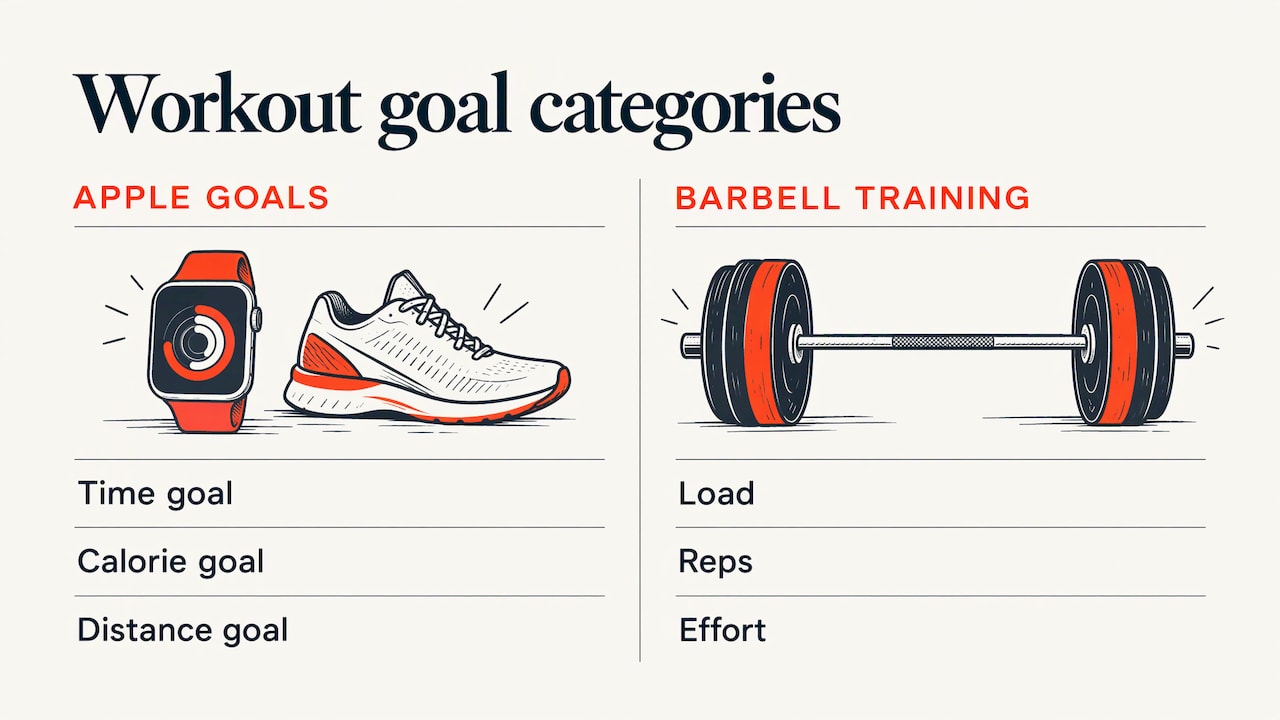
Apple also lets you structure a session. Custom workouts on iPhone require an Apple Watch with watchOS 26 or later paired to the iPhone. Workouts you create on the phone sync to the watch automatically, and they can include warmup and cooldown times, work and recovery intervals, and time, calorie and distance goals.
That is useful for interval work and conditioning. Notice what the goals are built from: time, calories and distance. Barbell training runs on load, reps and effort, which these goals do not describe.
Log a workout after the fact
Forgot to start tracking? You can log a completed workout in Fitness by tapping Workout, choosing a type, and adding details like duration, distance and an estimate of active calories. The entry then appears on the Sessions card in your Activity summary. You can also add a workout manually in the Health app through Browse, Workouts and Add Data, and it counts toward your Move, Exercise and Stand rings.
Track a workout on Apple Watch
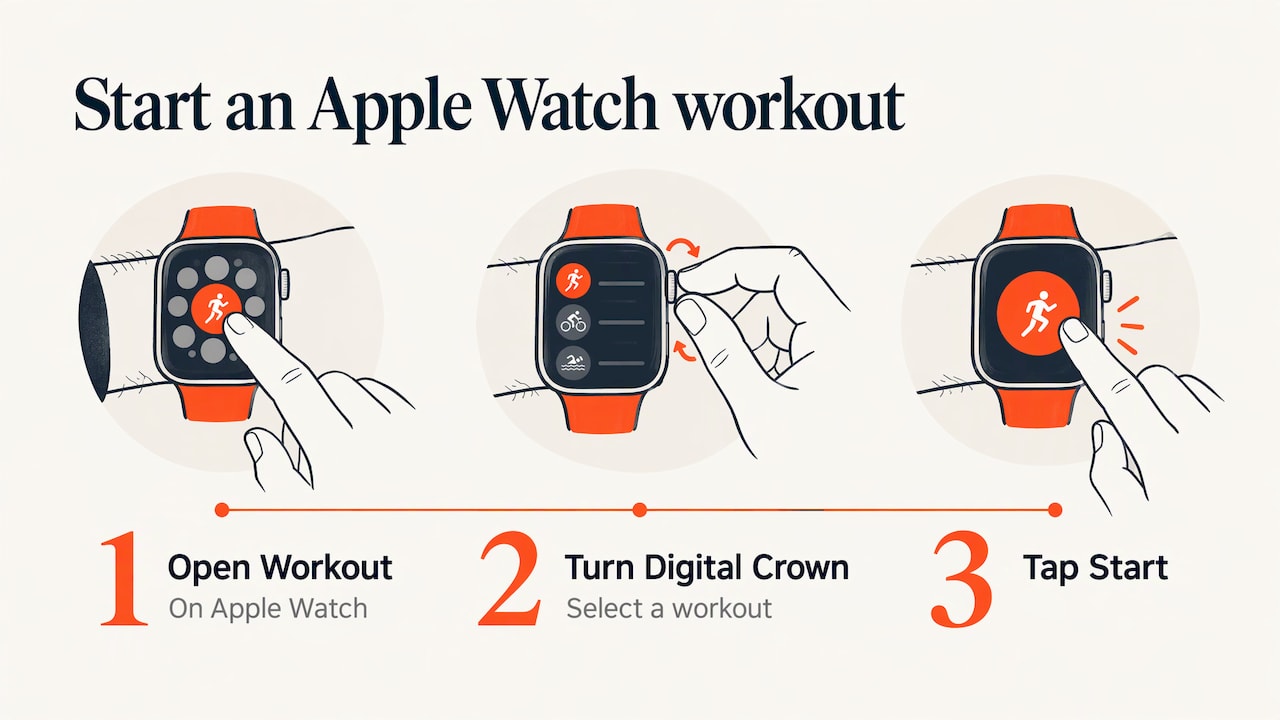
The watch is the better tool once you are away from your phone. Open the Workout app, turn the Digital Crown to the workout you want, and tap start. The list runs from HIIT, Outdoor Run and Outdoor Cycle to Functional Strength Training, Core Training and Kickboxing. During a session you can see your goal ring, elapsed time, pace, distance, calories and heart rate.
Heart rate is where many lifters get curious. If you want to understand how the watch sets and uses its zones, this explainer on Apple Watch heart rate zones covers how they work and when to edit them.
One point for lifters: a built-in strength workout type records that you trained. It does not record each set as its own line with weight and reps. For that you need an app made for lifting.
What about Apple Fitness+?
Apple Fitness+ is a subscription service of guided videos. It offers 12 workout types, including HIIT, Yoga, Core, Pilates, Strength, Treadmill, Cycling, Rowing, Dance, Kickboxing and Mindful Cooldown. With a compatible Apple Watch, AirPods Pro 3 or Powerbeats Pro 2 you can see metrics such as workout time, heart rate and calories on screen. It is a class library. It is not a logbook of your own progression.
Where to see your workouts on iPhone
This is the question people ask most after their first tracked session. Open Fitness, tap Summary, and scroll to Sessions to see your workout and meditation history. Tap any entry for its details.
To look at a particular day, tap the Activity rings card, then the Calendar button, and choose a date. The same page explains the rings: red is Move (active calories), green is Exercise (minutes of brisk activity, Apple Watch required) and blue is Stand (hours in which you stood and moved for at least a minute).
Two small notes:
- Since iOS 14 the app is called Fitness. The Activity app was renamed, and the Summary tab pulled together what used to sit across four tabs. Older guides still use the old name.
- If you want a quick glance at daily movement without opening the app, a widget can help. This guide to checking Apple Watch steps shows how step counts show up on your Home Screen, Lock Screen and watch.
What Apple Health stores, and how apps connect to it
The Fitness app is the dashboard. The Health app is the database underneath. Health automatically counts steps and walking and running distance, and with a paired Apple Watch it can track activity, heart rate and mindfulness data. You can also add data from other apps to keep everything in one place.
Connect an app and control what it can see
Permissions are yours to set, category by category. In Health, tap your profile, then under Privacy tap Apps, choose an app, and switch on the categories you want it to track. Some apps also need a setting changed inside the app itself before they share with Health.
A sensible habit: grant only what an app needs. A lifting app has little reason to see data you would rather keep private, and Health lets you turn any category off later.
Which source wins when two disagree
If your watch, phone and an app all record the same thing, Health has to choose. By default it prioritizes manually entered data first, then data from iPhone, iPad and Apple Watch, then data from apps and Bluetooth devices. You can change that order at any time in the same place.
When a workout is missing, doubled or not syncing
Most problems come from three causes: a permission is off, two sources recorded the same session, or the watch and phone had not finished syncing. Work through this list in order.
- Check the permission. Open Health, tap your profile, tap Apps under Privacy, and open the app in question. Confirm the categories you expect, such as workouts and heart rate, are switched on.
- Check the app’s own setting. Some apps keep a separate toggle for sharing with Health. Look in the app’s settings.
- Look at the source order. If a number looks wrong, the app may be outranked by another source. Review the priority order described above.
- Look for two recorders. If the same session appears twice, you probably started it on the watch and in another app at once. Pick one recorder per session and stop the other from writing workouts to Health in the Apps list.
- Give the devices time. Keep the watch near the phone, unlocked and charged, and open the Health app once so data can arrive.
- Add it by hand as a last resort. If the session is truly gone, log it manually so your rings and history stay complete.
The cleanest fix for duplicates is a single rule: one app records, the others only read.
What a lifter needs beyond the built-in tools
Apple’s tools answer “how long and how hard did my body work?” A lifter also asks “what did I lift, and what should I lift next?” That second question needs a few things the Fitness app is not designed to hold:
- Set-level logging. Weight, reps and effort for each set, not a single session total.
- A next-session target. Progressive overload only works if you know last week’s numbers when you walk up to the bar.
- Exercise guidance. Clear demonstrations so you can check your setup.
- Trends that mean something. Weight and volume over time, plus personal records.
- Low friction. A set logged in a second or two, with a phone in a pocket or a watch on your wrist.
If you want a deeper look at the habit side, we wrote a simple system for tracking workouts that works with any tool.
How to choose a lifting tracker on iPhone
When you compare apps, judge them on these points:
| Question | What to look for |
|---|---|
| How fast is logging? | A set should take seconds, ideally on the watch as well as the phone |
| Does it plan the next session? | Suggested weight and reps based on what you just did |
| Does it account for how you feel? | A way to say a day is rough and have the plan respond |
| Can you see progress? | Weight and volume charts, records, history by exercise |
| Can you get your data out? | Exports you can open in a spreadsheet or hand to a coach |
| What happens to your data? | Clear privacy terms, no ads built on health data |
| Does it fit your life? | Works with Apple Watch and holds all your numbers in one place |
A tracker that only records is a notebook. A tracker that proposes the next number is a training partner.
How Athlxpro handles iPhone workout tracking
Athlxpro is a strength training app for iPhone and Apple Watch. Its programs are built on progressive overload, and the app is designed around one idea: you should never have to remember last week’s weights.
Here is how it works in practice:
- It sets your next weight and reps. The suggestion comes from the sets you logged last time.
- It listens to your morning check-in. On a bad morning it holds the weight or takes a set off. Only your logged sets and the check-in change the plan.
- You log a set in one tap. A full workout can run on Apple Watch once the plan is on the watch, so the phone can stay in your bag.
- 577 exercise videos show you how each movement is done.
- Records, awards, XP and levels give you something to chase, and weight and volume charts show the trend.
- Programs run up to 6 days a week, so the plan can match the time you have.
It also keeps the rest of your day in view. Training, food, sleep, steps and heart rate appear on one screen. Food is logged by photo, which gives an AI estimate, or by barcode. Alex, the AI coach, sees your training, food, sleep, steps and heart rate. Apple Health data is shared with Alex only with your consent.
The community feed lets you post a session and see what others lift. When you need to share your numbers, PDF and CSV reports and a full JSON export are made on your iPhone, so you can hand a report to a coach or keep your own archive.
On privacy, Athlxpro has no ads and no ad tracking, and health data is never used for ads.
Try it
Athlxpro is a subscription, monthly or yearly, through the App Store, and it starts with a one week free trial, then $14.99 per month or $89.99 per year (US prices; other countries see theirs in the App Store). If you want your lifting history, next-session targets and watch logging in one place, see the monthly and yearly plans on Athlxpro.
Prices are shown in the App Store at checkout, so you see the current amount for your region before you commit.
A simple setup for your first week
You do not need to change everything at once. A practical way to start:
- Keep Apple’s tools for what they do well. Let your watch close your rings and record heart rate.
- Pick one app for lifting. Log every set there, so your history is in one place.
- Set permissions on purpose. In Health, review Profile, Privacy, Apps and switch on only what you want shared.
- Log right away. A set recorded in the moment is more accurate than one remembered later.
- Rate how hard it felt. Effort is what lets a plan decide between adding weight and holding steady.
- Review once a week. Check your charts and records, then look at the next session’s targets before you train.
After two or three weeks you will have enough history that the next numbers come from your own data.
FAQ
How can I track my exercise with my Apple Watch?
Open the Workout app, turn the Digital Crown to the workout type and tap start. You will see elapsed time, heart rate, calories and your goal progress during the session. When you finish, the workout appears in the Fitness app on your iPhone.
Where do I see my workouts on an iPhone?
Open Fitness, tap Summary and scroll to Sessions. Tap a workout to see its details. To check a specific day, tap the Activity rings card, then the Calendar button, and pick a date.
Can a workout app share data with Apple Health?
Many can, and you decide how much. In Health, tap your profile, then Apps under Privacy, and turn on the categories you want that app to use. Some apps also have their own sharing setting that must be switched on. For Athlxpro, the Apple Health data that Alex, the AI coach, sees needs your consent.
Why is the same workout showing up twice?
Usually two sources recorded the same session, for example the watch and an app at the same time. Choose one recorder per workout and stop the other from writing workouts to Health in the Apps list. You can also review the source priority order in Health.
Is the Fitness app enough for lifting?
It records time, heart rate and calories well, and it is a good home for your rings. For strength training you also want set-by-set weights and reps and a target for next time, which a dedicated lifting app provides.
Sources
- Start a workout in Fitness on iPhone, Apple Support
- Start a workout on Apple Watch, Apple Support
- Customize a workout in Fitness on iPhone, Apple Support
- How to use Apple Fitness+, Apple Support
- Log a workout in Fitness on iPhone, Apple Support
- See your activity summary in Fitness on iPhone, Apple Support
- Manage Health data on your iPhone, iPad, or Apple Watch, Apple Support
- How to manually add workout data to the Health app, iMore
- Fitness app: Everything you need to know, iMore